# dsh-better-sidebar
DSH 的双工作台:原生右侧栏 + 自绘底部面板,并把 ctx.betterSidebar 服务开放给所有插件

npm version npm downloads CI GitHub stars License: MIT 支持的 DSH 版本:0.2.0-rc.2+
🌏 中文 · English
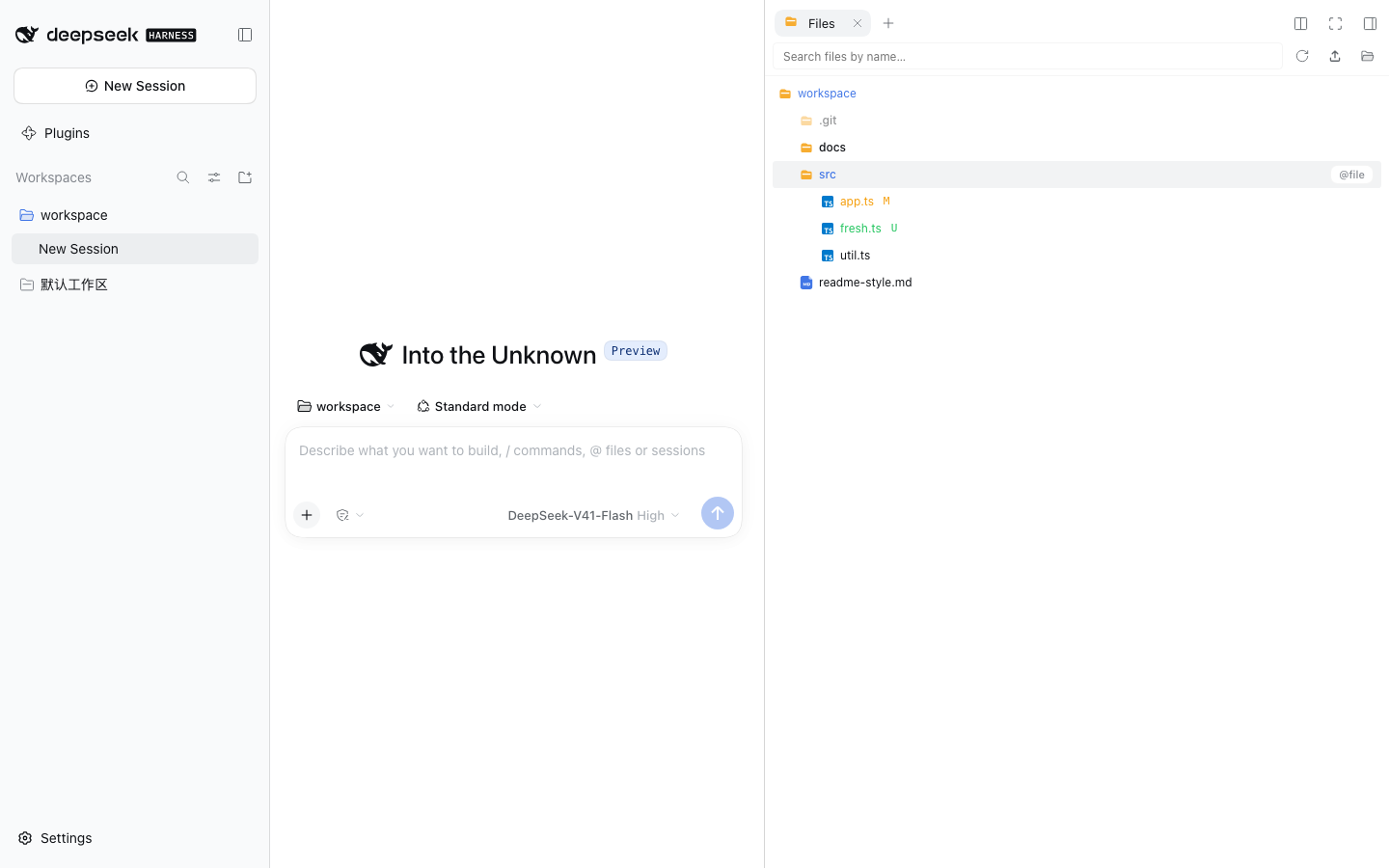
## ✨ 特色功能 | | | |---|---| | **🗂️ 文件管理**
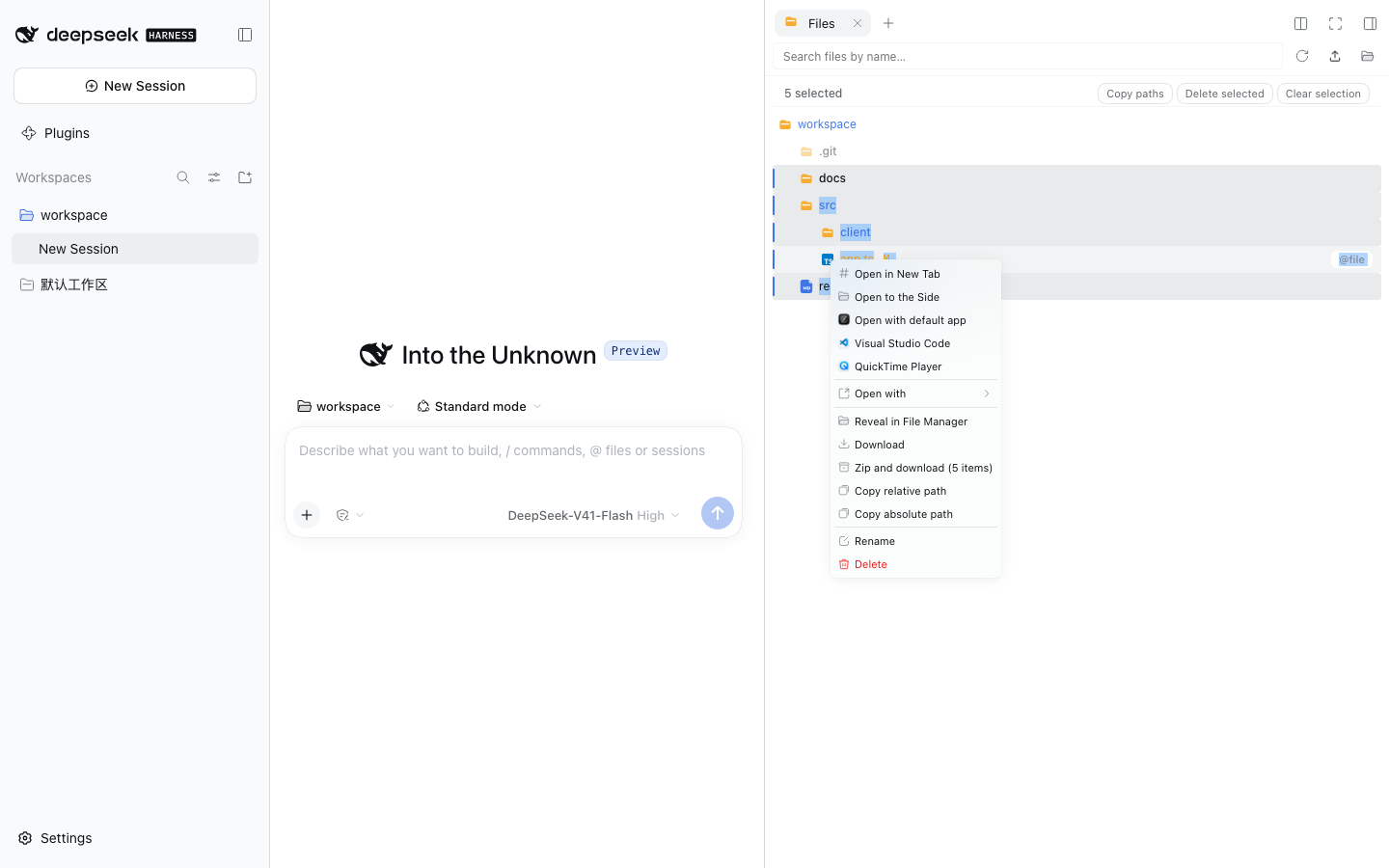
懒加载目录树、Git 变更着色、实时 watch 刷新、全局搜索、拖拽上传、多选批量操作、「打开方式」双源菜单。
文件树(Git 着色)
右键菜单:打开方式 + 打包下载 | **🌿 文件变动**
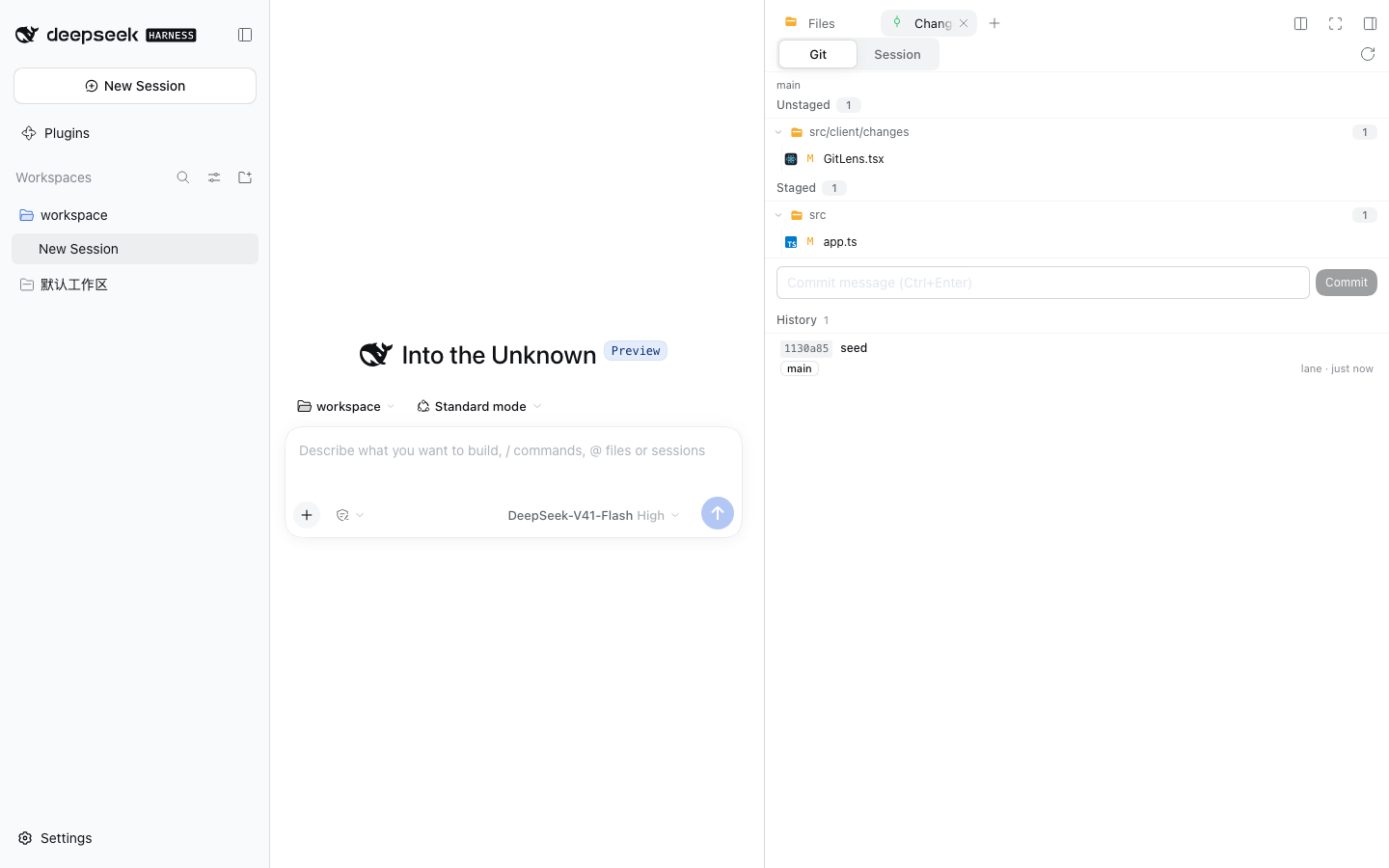
Git 视角 + 本轮 AI 改动视角合一:层级树、暂存 / 提交 / 历史、统一 diff 渲染(行内高亮 + 语法着色)。
文件变动:层级树 | | **📝 可编辑编辑器与预览**
可编辑的 CodeMirror(官方预览是只读)、Markdown + Mermaid + 浮动目录、HTML 沙箱预览、`.jsonl` 记录卡片、超大文件分页预览、传输无大小上限。
Markdown + Mermaid 预览 | **🧩 任务管理**
子代理拓扑实时预览(工作流图 / 树双模式)+ 后台任务清单:退出码、实时输出、强制终止。
任务页:子代理拓扑 | | **💬 侧边对话(beta)**
Codex 风格侧边线程:继承主会话完整上下文独立运行、实时推送、排队可见可撤回、每个线程独立选模型、一键提升为顶层会话。
侧边对话 | **🖥️ 底部工作台**
自绘底部面板与原生右侧栏同时展开:拖拽分栏、多终端页签、按会话持久化布局。
双工作台 | **还有**:📂 `sidebar_open` 工具让模型主动打开侧边栏 · ⚡ 启动只拉 ~325KB 核心、重依赖按需加载 · 🌏 多语言跟随 DSH · 📱 窄屏自动切换全宽抽屉 ## 🚀 安装 ```sh dsh plugin --profile web add dsh-better-sidebar@latest ``` 装完**硬刷新浏览器**(Cmd/Ctrl+Shift+R)即可。要求 DSH **0.2.0-rc.2+**。
按 DSH 版本选插件版本 | 你的 DSH 版本 | 安装命令 | | --- | --- | | **0.2.0-rc.2+**(含之后的正式版) | `dsh plugin --profile web add dsh-better-sidebar@latest` | | **0.1.7-rc.1 ~ 0.1.7 正式版** | `dsh plugin --profile web add dsh-better-sidebar@0.22.1` | | 0.1.7-alpha.x | 没有可装版本——先升级 DSH 到 rc.1 | | 0.1.6 及更早(含 0.1.5 线) | `dsh plugin --profile web add dsh-better-sidebar@0.19.1` | 旧版本一律写**精确版本号**(`latest` 会随新正式版前移)。命令里的 `web` 换成你自己的 profile 名即可。
其他安装方式 **让 DSH 自己装**——把这段提示词发给任意一个 DSH 会话: ```text 帮我安装 dsh-better-sidebar 插件(DSH 侧边栏工作台),步骤: 1. 执行 dsh plugin --profile web add dsh-better-sidebar@latest(latest 即当前正式版) 2. 完成后提醒我硬刷新浏览器(Cmd/Ctrl+Shift+R) 遇到报错先查 https://github.com/omdsh-dev/DSH-better-sidebar README 的常见问题表。 ``` **一键脚本**——克隆本仓库后执行 `bash scripts/install.sh`(macOS / Linux / Windows Git Bash;Windows 原生用 `install.ps1`),自动完成安装 + bundle 注册。 **更新**:重跑一次安装命令即可,然后硬刷新浏览器。
常见问题 | 现象 | 原因与解决 | |---|---| | 报 `Ignored build scripts` | pnpm 11 拦截了某个传递依赖的构建脚本。在 profile 目录(`~/.dsh/profiles/web`)跑 `pnpm approve-builds` 按提示放行——本插件自身已无构建脚本依赖。 | | 报 `minimum release age` / 版本不足 24h | 装的版本发布不足 24 小时。等 24h 或重跑一次(pnpm 会自动补 `minimumReleaseAgeExclude`)。 | | 报「找不到 profile 目录」 | 先跑一次 `dsh web`,让它初始化 `~/.dsh/profiles/web`。 | | 页面出现**两个侧边栏** | 双挂载。删掉 `~/.dsh/profiles/web/cordis.patch.yml` 里旧的手动挂载行(`- insert: ... better-sidebar ...`);聚合包以不同 id 挂载本包时会自动退让,无需处理。 | | 升级后设置页的值去哪了 | DSH 0.1.7 起偏好写在 profile 里本插件的挂载行上(默认 entry id `better-sidebar`),插件首次启动会把旧 `settings.yaml` 里的配置一次性回迁,不会覆盖新设的值。 | | 终端无法使用 | 终端由 **DSH 自身**提供(本插件不自带 PTY),请查 DSH 侧文档;底部终端显示「宿主未提供终端能力」= 这个部署没挂终端控制器。 | | 提示 `dsh: command not found` | 先安装 DSH;或用 `npx -y --package @deepseek-ai/dsh dsh plugin --profile web add dsh-better-sidebar@latest`。 |
## 🆕 最近更新 **v0.26.1** — 完整发布历史见 [Releases](https://github.com/omdsh-dev/DSH-better-sidebar/releases) · [CHANGELOG](./CHANGELOG.md) - ⚡ **修掉「0.24 没问题、之后越用越卡」的稳态开销**(社区反馈:侧栏在前台开久了卡、多轮对话后 DSH 卡、重启又暂时好;分界线经产物级 A/B 落在 v0.25.0):两个 500ms 表按可见性门控(右侧面板展开态改全模块一条共享表、空白会话兜底入口只在真的渲染时起表)、每 tab 的 5s 会话根轮询收敛成**每会话一条且只在可见时**、文件树 watch 与侧聊推送 parked 即停、`keepMounted` 保留语义但缓存与记账全部有界、宿主 cwd 解析加在飞去重且 TTL 3s→15s - 📊 真机实测(4 个访问过的页签、15s 空闲窗):活着的 500ms 表 **3→1**、5s 表 **5→0**、`session.cwd` 请求 **15→0**、命中测试 **1620→0**、强制布局 **5190→30** **v0.26.0** — 完整发布历史见 [Releases](https://github.com/omdsh-dev/DSH-better-sidebar/releases) · [CHANGELOG](./CHANGELOG.md) - 🚀 **传输全面流式化**:上传 / 下载 / HTML 预览 / 打包再无大小上限;超大文件改为只读分页预览 - 📄 新增 **`.jsonl` / `.ndjson` 预览**:逐条可折叠的记录卡片,可编辑保存 - 💬 **侧边对话实时化**:消息推送到达、排队可见并可按条撤回、每个线程独立选模型 - 🧩 **任务管理面板重构**:按组展开、Token 用量与耗时、画布动效 - 🖥️ 底部工作台**多终端页签**;⚡ git 状态轮询不再拖慢界面(基线 30s,自动退档) ## 🔌 插件生态 `ctx.betterSidebar` 向所有插件开放 `registerTab` / `registerFileViewer` 两个扩展点,内置 6 tab + 4 viewer 与第三方插件走同一套 API。GitHub topic [`dsh-better-sidebar`](https://github.com/topics/dsh-better-sidebar) 下已有 **30+ 生态插件**;完整接入文档见 **[docs/external-plugin-guide.md](./docs/external-plugin-guide.md)**。 ```ts import type {} from 'dsh-better-sidebar' // 触发 ctx.betterSidebar 类型合并 export const inject = ['betterSidebar'] export function apply(ctx: Context) { ctx.effect(() => ctx.betterSidebar.registerTab({ id: 'my-plugin:db', title: 'Database', component: ({ scope }) => , })) } ```
生态插件目录(28 个 Tab 插件 · 4 个预览插件 · 4 个增强工具) ### 📑 Tab 插件(注册侧边栏页面) | 插件 | ⭐ | 简介 | |---|---|---| | [ChenRuoT/dsh-sidebar-qa](https://github.com/ChenRuoT/dsh-sidebar-qa) | stars | 划选追问侧边页:类 Codex 侧边提问 / Claude Code `/btw` | | [fuhefei/dsh-sentinel](https://github.com/fuhefei/dsh-sentinel) | stars | 条件驱动唤醒系统:文件 / 命令 / HTTP / 进程 / Webhook 监视,到点唤醒 agent;dock + 侧栏分支 + 全局仪表盘 | | [Fisfzy/ego-browser](https://github.com/Fisfzy/ego-browser) | stars | Agent 浏览器:i18n 感知的本机浏览器 Tab(装了 better-sidebar 自动注册侧边栏页,未装回退浮动浮窗观察) | | [jiuge2467/dsh-studio](https://github.com/jiuge2467/dsh-studio) | stars | 全栈增强工作台:多源 MCP 可视化调试中枢、视觉思考引擎 | | [Iwctwbh/dsh-flowglass](https://github.com/Iwctwbh/dsh-flowglass) | stars | 流镜 Flowglass:会话流程图实时可视化(消息 / 工具组 / 子代理分支) | | [FeatherHunter/dsh-mattpocock-skills-deck](https://github.com/FeatherHunter/dsh-mattpocock-skills-deck) | stars | mattpocock/skills 游戏化任务系统:地图拨迷雾、任务栏推进 | | [GULI-lab/DSH-element-source](https://github.com/GULI-lab/DSH-element-source) | stars | 点击页面任意 UI 元素直达 Vue / React / Svelte / Angular 源码并送入会话 | | [Lzh3070/dsh-file-review-tab](https://github.com/Lzh3070/dsh-file-review-tab) | stars | 文件改动审查页:行级红绿 diff + 撤销 + chat 行深链 | | [yq04/dsh-git-remotes](https://github.com/yq04/dsh-git-remotes) | stars | Git 远程页:分支 / 上游 / ahead-behind,fetch 可 prune、ff-only pull、确认后 push | | [ztyhehe/dsh-better-sidebar-svn](https://github.com/ztyhehe/dsh-better-sidebar-svn) | stars | SVN 源码管理页:status / diff / log / commit / update / revert / 冲突解决,与内置 Git 面板对称 | | [Melody-max114/dsh-excel-panel](https://github.com/Melody-max114/dsh-excel-panel) | stars | Excel 编辑页:xlsx 预览 / 编辑、公式实时计算、合并单元格、保存回原文件 | | [v587d/dsh-anysearch-refs](https://github.com/v587d/dsh-anysearch-refs) | stars | AnySearch 搜索结果引用卡片:搜索词、来源摘要、关键词高亮 | | [Lukeknow0/dsh-markdown-link-preview](https://github.com/Lukeknow0/dsh-markdown-link-preview) | stars | Markdown 产物链接预览:点击聊天中的同源 `.md` 输出文件,直接在侧边栏阅读 | | [mlosun/dsh-docs-panel](https://github.com/mlosun/dsh-docs-panel) | stars | 全局文档面板:随身 Markdown 笔记,任何工作区随时可读 | | [tylina/dsh-tylina](https://github.com/tylina/dsh-tylina) | stars | Typst 文档编辑工具:WYSIWYG 编辑排版论文、报告、试卷、简历、图表、海报、乐谱和 PPTX 导出的 Slides | | [lnyuqian/dsh-skill-sidebar](https://github.com/lnyuqian/dsh-skill-sidebar) | stars | 技能面板:扫描本机技能目录,4-6 字功能短语 + 一键复制调用 + 置顶 | | [g-yixuan/dsh-sidenote](https://github.com/g-yixuan/dsh-sidenote) | stars | Codex 风格侧边对话 + 划选引用注释(轻量消费插件) | | [OMSociety/dsh-ssh-tunnel](https://github.com/OMSociety/dsh-ssh-tunnel) | stars | 多主机 SSH 隧道 + SSH 管理器页 | | [OMSociety/dsh-git-forge](https://github.com/OMSociety/dsh-git-forge) | stars | GitHub / Gitea 账号、项目授权与推送策略 | | [YesSanSan/dsh-conversation-outline](https://github.com/YesSanSan/dsh-conversation-outline) | stars | 对话大纲页:按轮次结构化展示、一键跳转、LLM 一句话标题 | | [Wulabalabo/dsh-sidebar-Explorer-Plus](https://github.com/Wulabalabo/dsh-sidebar-Explorer-Plus) | stars | 文件管理页:上传 / 移动 / 删除 / 重命名 / 新建文件夹(补全写操作) | | [yq04/dsh-turn-review](https://github.com/yq04/dsh-turn-review) | stars | 本轮审查:逐回合审查 agent 改动 | | [Ghz114514/dsh-refpics](https://github.com/Ghz114514/dsh-refpics) | stars | Pinterest 风格参考图搜索:瀑布流、侧栏画板、下载与 Eagle 收藏 | | [yzlin499/dsh-yzlin499-easy-plugins](https://github.com/yzlin499/dsh-yzlin499-easy-plugins) | stars | 实用小工具集(毛坯房 DSH 友好) | | [dong-victor/dsh-better-sidebar-starter](https://github.com/dong-victor/dsh-better-sidebar-starter) | stars | 运行配置页:IDEA 式 Run/Debug 配置——一键启动、历史保存、WebSocket 实时日志、多实例并行 | | [baosfeng/my-dsh-plugins](https://github.com/baosfeng/my-dsh-plugins) | stars | 个人多插件合集(`dsh-file-activity`):侧边栏文件活动页——文件读取 / 新增 / 修改历史与统计 | | [Hoemr/dsh-better-overleaf](https://github.com/Hoemr/dsh-better-overleaf) | stars | Overleaf 标签页:直连 CDP 浏览器登录、项目切换、本地 git 镜像与双向同步 | | [Andor-Z/dsh-turn-outline](https://github.com/Andor-Z/dsh-turn-outline) | stars | 轮次轨迹页:按用户轮次折叠会话,点击任意步骤跳回对话原位;零 LLM、只读 | ### 🖼️ 预览插件(注册文件预览器) | 插件 | ⭐ | 简介 | |---|---|---| | [HuanLinOTO/dsh-plugin-better-sidebar-plugin-office](https://github.com/HuanLinOTO/dsh-plugin-better-sidebar-plugin-office) | stars | Office 三件套预览(.docx / .xlsx / .pptx),独立 bundle 瘦身主体 | | [HuanLinOTO/dsh-plugin-better-sidebar-plugin-audio](https://github.com/HuanLinOTO/dsh-plugin-better-sidebar-plugin-audio) | stars | 音频预览:可缩放波形播放器 + 实时频谱,HTTP Range 流式媒体路由,任意大小可拖进度 | | [zemul/dsh-video-preview](https://github.com/zemul/dsh-video-preview) | stars | 视频内联预览:.mp4 / .webm / .mov / .mkv / .avi,HTTP Range 拖进度条 | | [dong-victor/dsh-better-sidebar-jupyter](https://github.com/dong-victor/dsh-better-sidebar-jupyter) | stars | `.ipynb` 可运行 Notebook 视图:懒启动 Python kernel、流式输出、保存回写 | ### 🧰 增强与工具 | 插件 | ⭐ | 简介 | |---|---|---| | [eg-bole/dsh-better-sidebar-icons](https://github.com/eg-bole/dsh-better-sidebar-icons) | stars | VSCode 风格文件 / 文件夹图标主题(vscode-icons 移植,纯 DOM 覆盖零侵入) | | [dong-victor/dsh-better-sidebar-terminal-plus](https://github.com/dong-victor/dsh-better-sidebar-terminal-plus) | stars | 终端增强:内嵌 Nerd Font 图标字体、修复 xterm 图标渲染、稳定终端 cwd | | [Max-Null/dsh-sidebar-preview-select](https://github.com/Max-Null/dsh-sidebar-preview-select) | stars | 预览划选增强:侧边栏预览里划选文本 → 浮动「发送到会话」 | | [Hoemr/dsh-quicklook](https://github.com/Hoemr/dsh-quicklook) | stars | QuickLook 式空格预览:活动文件标签页按 Space 全尺寸查看图片 / PDF / 文本 |



> 📣 **上架你的插件**:给仓库打上 `dsh-better-sidebar` topic 即出现在 [topic 页](https://github.com/topics/dsh-better-sidebar);再向 [`src/client/plugins-tabs.ts`](./src/client/plugins-tabs.ts) / [`plugins-viewers.ts`](./src/client/plugins-viewers.ts) 提一条 `PluginEntry` PR,即可进入设置页内置推荐目录。
⌨️ 快捷键 | 操作 | 按键 | |---|---| | 保存编辑 | `Ctrl/Cmd + S` | | 文件内查找 / 替换 | `Ctrl/Cmd + F` | | 查找下一个 / 上一个 | `Ctrl/Cmd + G` / `Shift + Ctrl/Cmd + G` | | 选中下一个相同片段 | `Ctrl/Cmd + D` | | Git 提交 | `Ctrl + Enter` | | 关闭 Tab | 鼠标中键 | | 拆分/合并分栏 | 拖 Tab 到分栏边缘 / 中间 | | 引用文件到输入框 | 悬浮行尾 `@文件` 按钮 |
🔐 安全与 ⚠️ 已知限制 - 路由受 Host 头信任围栏保护(与 `/api` 一致);`fs.write` 原子写入;git 只调 CLI、绝不设置身份 - ⚠️ **v0.23.0 起文件系统路由不做工作区包含检查**:能读写宿主用户可访问的任意路径(只受 OS 权限约束)——调用方不能再把这些路由当作被围栏保护的接口 - HTML 预览在**不透明源沙箱 iframe** 中渲染;设置页可按功能关闭沙箱(默认关闭,带警告文案) - Git 无 push/pull/fetch;文件树只对**已展开**的目录做 watch;Markdown 预览渲染的是已保存文件 - 只读预览的格式(表格 / PDF / 图片 / Office)由 DSH 内置文档预览渲染,实现随宿主版本走;浏览器视图只在 desktop profile 存在 - 未保存草稿在关闭标签页 / 删除文件 / 刷新页面前都会先确认;磁盘被外部改动后再保存会被拒绝,不会静默覆盖 - 移动端(<768px)无底部面板,其标签页并入右侧栏全宽抽屉
🛠️ 开发与构建 ```sh pnpm install # @deepseek-ai/* devDependencies 已发布,直接解析 pnpm typecheck && pnpm lint && pnpm build && pnpm test make check # 聚合校验门禁(对齐 CI) make mount # 真机挂载冒烟:build + pack → pnpm test:mount ``` **架构**:单 npm 包、host/client 双半结构——host(`src/index.ts`):`/sidebar/api/*` JSON API、媒体 / HTML 预览 / 上传路由与两条 WebSocket;client(`src/client/index.tsx`):原生右侧栏 tab + 底部工作台;状态按会话持久化 localStorage。仓库工作规范见 [`AGENTS.md`](./AGENTS.md)。 Windows / Linux / macOS 三平台适配(macOS 日常验证,其余经单元测试与 Windows CI 覆盖);无原生依赖,构建只需 Node ≥ 20 + pnpm ≥ 10。
## 💬 社区 推荐添加 QQ 群(577011007)
微信群二维码 QQ群二维码
## 🤝 参与贡献 - **代码改动走 PR**:`feat/*` / `fix/*` 分支开发 → `gh pr create`;提交前跑 `pnpm typecheck && pnpm build && pnpm test`(或 `make check`) - **收录生态插件**:给仓库打 `dsh-better-sidebar` topic + 向 [`src/client/plugins-tabs.ts`](./src/client/plugins-tabs.ts) / [`plugins-viewers.ts`](./src/client/plugins-viewers.ts) 提 PR - 仓库工作规范见 [`AGENTS.md`](./AGENTS.md) ## 👥 贡献者 贡献者 ## 🔗 友情链接 - [dsh-tianshu-tui](https://github.com/huiliyi37/dsh-tianshu-tui):DeepSeek Harness 交互式终端 UI 插件,增加 TDD 与证据门等工作流 - [dsh-TUI](https://github.com/ccch1mneyyy/dsh-TUI):Claude Code 风格全屏交互终端插件——像素鲸鱼顶栏、思考流式展开、上下文进度条 + TPS 仪表 - [dshfind 插件超市](https://dshfind.com/zh/plugins):三方插件市场——GitHub topic `dsh-plugin` 下的公开仓库清单,每日同步 - [DeepSeek Harness Desktop Tauri](https://github.com/hairyf/deepseek-harness-desktop):Tauri 桌面版——5MB 安装包、零环境配置、预置插件开箱即用 - [DeepSeek Harness Desktop](https://github.com/anywhere-labs/deepseek-harness-desktop):现代化桌面端——无需配置 Node.js 即可启动和管理本地 Harness 服务;[官网](https://www.dshdesktop.cn) ---
MIT License · Built for the DeepSeek Harness ecosystem · 在 topic dsh-better-sidebar 发现更多生态插件